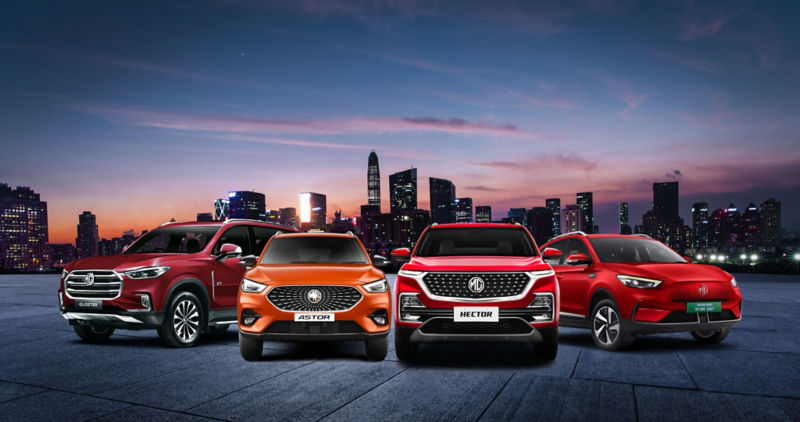
Explore MG cars
  • MG Windsor EV
    MG Windsor EV
  • MG Comet EV
    MG Comet EV
  • MG ZS EV
    MG ZS EV
  • MG Majestor
    MG Majestor
  • MG Hector
    MG Hector
  • MG Astor
    MG Astor
  • MG Gloster
    MG Gloster
Discover MG Select
starting at 9.99 LAKH + 3.99/km starting at 12.25 LAKH + 4.50/km starting at 9.99 LAKH + 3.99/km

MG Windsor EV MG Windsor EV Pro MG Windsor EV Inspire

Windsor Pro Inspire

Drive into the future with the MG Windsor EV - a premium electric CUV offering advanced technology, superior comfort, smart connectivity, and efficient urban mobility

Drive into the future with the MG Windsor EV Pro - a premium electric CUV offering advanced technology, superior comfort, smart connectivity, and efficient urban mobility

Drive into the future with the MG Windsor EV Inspire - a premium electric CUV offering advanced technology, superior comfort, smart connectivity, and efficient urban mobility

starting at 4.99 LAKH + 3.20/km starting at 7.63 LAKH + 3.20/km

MG comet EV MG Comet EV Blackstorm

Comet EV Blackstorm

Experience smart city driving with the MG Comet EV - a compact electric car designed for urban mobility, intelligent features, easy parking, and sustainable everyday journeys.

Experience smart city driving with the MG Comet EV Blackstorm - a compact electric car designed for urban mobility, intelligent features, easy parking, and sustainable everyday journeys.

starting at 13 LAKH + 4.50/km

MG ZS EV

Discover the MG ZS EV - a feature-packed electric SUV combining long-range performance, intelligent technology, premium comfort, and a seamless EV driving experience.

starting at ₹ 40.99* lakhs

MG Majestor

Step into a new era of dominance with the all-new MG Majestor, 
a premium full-size SUV built to conquer every terrain.

starting at ₹ 11.99* lakhs

MG Hector

Explore the MG Hector - a smart SUV equipped with advanced connectivity, spacious interiors, premium comfort, and intelligent safety features for modern family journeys.

starting at ₹ 9.79* lakhs

MG Astor

Experience the MG Astor - an intelligent SUV featuring personal AI assistance, advanced safety technology, stylish design, and a refined driving experience.

starting at ₹ 38.33* lakhs starting at ₹ 40.46* lakhs starting at ₹ 41.07* lakhs

MG Gloster MG Gloster Blackstorm MG Gloster Storm Series

Gloster Blackstorm Strom series

Conquer every journey with the MG Gloster - a premium full-size SUV offering powerful performance, advanced driver assistance systems, luxurious comfort, and commanding road presence.

Conquer every journey with the MG Gloster Blackstorm- a premium full-size SUV offering powerful performance, advanced driver assistance systems, luxurious comfort, and commanding road presence.

Conquer every journey with the MG Gloster storm Series - a premium full-size SUV offering powerful performance, advanced driver assistance systems, luxurious comfort, and commanding road presence.


Wireless Connection- Android Auto

By connecting the mobile phone with the vehicle together, Android Auto brings the convenience and efficiency of Android applications into vehicles, including navigation, music, phone call, voice assistance and message etc.

Wireless Android Auto Connection

a) Connection in Setting – Bluetooth Interface

Enable Bluetooth of mobile Phone in the Phone Setting - Bluetooth interface and enable wireless Android Auto in the Android Auto App of the phone.

Turn on Bluetooth in the Setting - Bluetooth Connection interface on the entertainment system, search for your phone and create a Bluetooth connection.

After the Bluetooth successfully connected, the Android Auto connection request will automatically pop out on the entertainment system whilst a pop-up also on your phone, and you can start wireless Android Auto after all agree.

b) Connection in Device Management Interface

Enable Bluetooth of mobile Phone in the Phone Setting - Bluetooth interface and enable wireless Android Auto in the Android Auto App of the phone.

Search for device in the Device management interface on the entertainment system and select your target device to be connected.

After the Bluetooth successfully connected, the Android Auto connection request will automatically pop out on the entertainment system whilst a pop-up also on your phone, and you can start wireless Android Auto after all agree.

Please DO NOT use a mobile phone whilst driving, it is dangerous and illegal.

  • Return to main interface by pressing the Exit button in Android Auto.
  • Simply disconnect or delete the connected mobile device in Device Management to exit current Wireless Android Auto.

What user need for wireless Android Auto is:

  • A compatible Android phone with an active data plan and 5 GHz Wi-Fi support.
  • Android phone with Android 11.0 or higher is highly recommended.

Vehicle user interface is a product of Google, and its terms and privacy statements apply. Requires the Android Auto app on Google Play and a compatible Android smartphone. Data plan rates apply. You can check which smartphones are compatible at g.co/androidauto/requirements.